Apple CarPlay has become one of the most desired upgrades for drivers today. It brings navigation, music, calls, texts, and voice control directly to your dashboard in a familiar and safer interface. With the promise of “plug and play,” many drivers attempt to install CarPlay themselves — only to run into costly headaches. At AutoWorks, we’ve seen it all. Here are the top mistakes people make when installing Apple CarPlay themselves, and why trusting a reputable installer like AutoWorks in New Jersey can save you time, money, and stress.
1. Choosing the Wrong Head Unit
One of the first mistakes DIY installers make is buying a head unit that looks compatible with CarPlay — but isn’t fully supported.
Not all aftermarket stereos labeled as “CarPlay capable” are created equal. Some may only support wired CarPlay, while others lack proper integration with your vehicle’s CAN bus system (important for steering wheel controls, backup camera sync, speed sensing, etc.). Worse, cheap units often suffer from buggy software, poor touch response, and weak hardware that doesn’t update reliably.
Why this matters: A head unit that doesn’t match your vehicle’s electronics can lead to:
-
Loss of steering wheel audio controls
-
Inaccurate vehicle info display
-
Poor sound quality or interference
-
Malfunctioning backup camera feed
💡 At AutoWorks, we only recommend head units that are fully tested for your specific make, model, and year — ensuring seamless CarPlay performance.
2. Ignoring Vehicle-Specific Wiring Needs
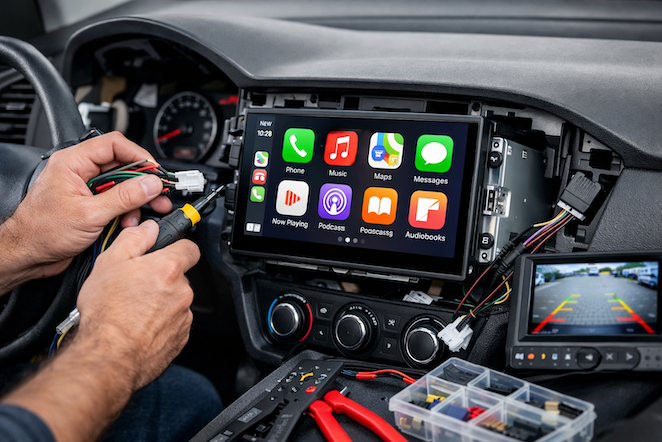
Modern vehicles aren’t simple electrical systems. They have multiple CAN lines, data buses, and modules that need to communicate with the radio. DIY installers often overlook important wiring:
-
Ignition sense wires
-
Illumination and dimming signals
-
Battery/constant power vs. accessory power
-
Door trigger and parking brake inputs
Plugging everything in incorrectly can cause:
-
Stereo draining your battery
-
Erratic behavior during start/stop driving
-
Warning lights on the dash
A professional installer will use the appropriate wiring harnesses and adapters designed for your vehicle. These preserve factory features and prevent strange quirks after installation.
 3. Skipping Firmware Updates
CarPlay, like any software, evolves. New phones, new iOS versions, and updated head unit firmware can all affect compatibility.
DIY installers often fail to:
-
Update the stereo’s firmware before installation
-
Update CarPlay software on the head unit after setup
Failing to update firmware can result in:
-
CarPlay freezing
-
Bluetooth dropping intermittently
-
Siri not responding to voice commands
At AutoWorks, we always perform a full firmware update as part of our installation process — giving you smooth, reliable CarPlay day after day.
4. Poor Integration with Vehicle Features
A common frustration with DIY installations is losing vehicle integration features that were working before:
-
Steering wheel control buttons no longer function
-
Backup camera doesn’t display automatically
-
Bluetooth calls routed incorrectly
-
Factory amp/sound system disrupted
This happens when installers don’t properly interface with the vehicle’s existing systems. Many aftermarket radios require a specialized integration module to preserve factory functionality. Without it, some features simply won’t work the way they should.
5. Incorrect Mounting and Panel Fit Issues
Installing the unit without proper brackets, dash kits, or trim pieces may lead to:
-
An uneven or loose fit
-
Rattling or vibration
-
Exposed wiring behind the dash
-
Head unit shifting while driving
A professional installer has access to vehicle-specific dash kits and knows the correct mounting hardware, so the finished install looks clean and factory-like — not like an obvious aftermarket add-on.
6. Overlooking Antenna and Signal Quality
CarPlay can run either wired (USB) or wireless. Wireless CarPlay requires a strong and stable signal between your phone and the head unit. DIY installers often:
-
Simply plug in a USB cable and assume it will work flawlessly
-
Use cheap extension cables that degrade signal quality
-
Place USB hubs or connectors in locations that interfere with connectivity
This leads to:
-
CarPlay disconnecting randomly
-
Slow response times
-
Music cutting in and out
Professionals ensure signal-ready USB placement and use quality wiring to prevent interference.
7. Not Calibrating After Installation
After wiring and mounting, a proper installation still isn’t complete until the system is calibrated. This includes:
-
Setting clock and radio presets
-
Syncing steering wheel controls
-
Adjusting screen settings and touch sensitivity
-
Verifying all vehicle functions work as intended
DIY installations often stop at “it turns on,” leaving calibration undone — which means you never get the optimal experience.
Why AutoWorks Is the Smart Choice
Installing Apple CarPlay may seem straightforward — but as you can see, there are many pitfalls. At AutoWorks in New Jersey, we combine technical expertise, vehicle-specific knowledge, and premium parts to deliver installations that:
✅ Retain factory features
✅ Communicate flawlessly with your smartphone
✅ Look and feel like they came from the factory
✅ Last for years without issues
Don’t gamble with your vehicle’s electronics. Schedule an Apple CarPlay installation with AutoWorks today and enjoy the full benefits of connected driving without the headaches. If you would like more information concerning our auto electronics and installation services, contact us today at 732-671-0225 or visit the website.
