Monmouth County Custom Car Audio | Tinting | Restorations

NJ Monmouth County Car Stereo, Tinting, Remote Starters, Car Alarms

CUSTOM CAR AUDIO ~ TINTING ~ REMOTE STARTERS ~ HOOD & ROOF WRAPS ~ CUSTOM TIRES & WHEELS ~ CHROME DELETES ~ JEEP & TRUCK ACCESSORIES ~ ALARMS ~ LIGHTING UPGRADES ~ WIRING ~ BACK-UP CAMERA ~ CLASSIC & MUSCLE CAR UPGRADES & MODIFICATION

732.671.0225

  • Home
  • Window Tinting
  • Remote Starters
  • Audio & Video
  • Car Accessories
  • Hot Rods
  • Blog

Is Your Vehicle CarPlay-Compatible? How AutoWorks Makes an Upgrade Possible

August 21, 2025 By admin

In today’s world, staying connected—even behind the wheel—is more crucial than ever. Whether you’re navigating traffic, making hands‑free calls, or enjoying your favorite podcast, having seamless iPhone integration via Apple CarPlay transforms the driving experience. But what if your ride didn’t come with built‑in CarPlay? That’s where AutoWorks steps in.

Why CarPlay Matters—Even if Your Car Didn’t Come with It

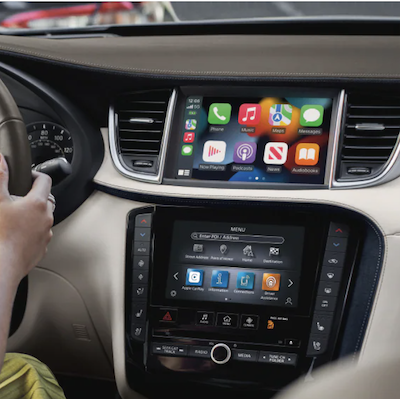
Apple CarPlay links your iPhone to your car’s infotainment system, delivering a sleek interface to manage maps, messages, music, and more. The benefits are substantial:

  • Hands‑free control via Siri keeps your eyes—and focus—on the road.

  • Navigation apps like Apple Maps, Google Maps, and Waze deliver real‑time directions and traffic whilst minimizing distraction.

  • Entertainment at arm’s length, with easy access to Spotify, Apple Music, podcasts, and audiobooks.

  • Enhanced safety, blending connectivity with intuitive design that’s familiar to iPhone users.

Think Your Vehicle Is Excluded? Think Again.

Not all vehicles come CarPlay‑ready straight from the factory—but many can be upgraded. AutoWorks specializes in professional CarPlay retrofits, offering compatibility across a wide spectrum of makes and models:

  • Popular brands served: Audi, BMW, Chevrolet, Ford, Honda, Jeep, Mercedes‑Benz, Nissan, Toyota, Volkswagen, and more.

  • Even older models without CarPlay from the factory are eligible for these upgrades, bridging the gap between modern smart tech and your existing vehicle.

The AutoWorks Difference: Expert, Seamless, and Affordable

What sets the AutoWorks CarPlay upgrade apart?

  • Skilled Technicians: With deep experience in auto electronics, their team expertly installs CarPlay—even ensuring compatibility with dashboard controls like steering wheel buttons.

  • Top‑Tier Components: Only high-quality aftermarket head units are used, delivering long-term reliability.

  • Flawless Integration: CarPlay is integrated to blend seamlessly with your vehicle’s existing features, preserving a clean, OEM-like look and functionality.

  • Competitive Pricing & Quick Service: Transparent estimates and fast, same-day or few-hours turnaround get you on the road sooner.

Monmouth County Apple Carplay UpgradeUpgrade Process—Simple and Stress-Free

Getting CarPlay installed at AutoWorks is straightforward:

  1. Reach Out: Begin with a quick conversation to confirm your vehicle’s compatibility and ideal system setup.

  2. Schedule an Appointment: Choose a time that works best for you.

  3. Professional Installation: The experienced team completes the integration cleanly and efficiently.

  4. Final Setup & Demo: Walk through the new interface, learn how to activate Siri, and start using CarPlay—right away.

Real Drivers, Real Feedback

Local drivers in Middletown, NJ, appreciate AutoWorks’ friendly, knowledgeable service:

“I couldn’t figure out how to get Apple CarPlay on my Jeep while also maintaining the backup camera. They walked me through my…” — Happy customer, praising both expertise and clarity.
“These guys are top notch. Great install work and stand by their lifetime warranties.” — Another impressed reviewer on installation quality and service commitment.

Additional Tech Solutions: Beyond CarPlay

AutoWorks also offers complementary upgrades to enhance your vehicle’s tech ecosystem:

  • BMW & Mini Upgrades: The BimmerTech CarPlay MMI Prime retrofit integrates CarPlay (and Android Auto) with full functionality of iDrive and steering wheel controls, including 8‑band EQ, USB ports, and wireless connectivity.

  • Android Auto & Receiver Upgrades: For Android users, they install compatible Pioneer head units or retrofit kits—perfect for brands like Porsche and more—bringing in Google Maps, voice control, and media integration.

Final Thoughts: Why You Should Consider Upgrading Now

  • Safety & Convenience: CarPlay keeps you connected without distraction.

  • Modern Features: Transform even older vehicles into contemporary smart cars.

  • Trusted Professionals: AutoWorks NJ delivers quality, clarity, and customer-first service.

  • Local Expertise: Proud service provider for Monmouth County towns like Red Bank, Middletown, Long Branch, and beyond.

Ready to Future-Proof Your Ride?

Whether it’s for navigation, hands-free calls, or streaming music—Apple CarPlay makes driving smarter and safer. Reach out to AutoWorks at 732-671-0225 or visit their Middletown location at 1031 NJ-35, Middletown, NJ. Experience the upgrade—and the road—with confidence.
NJ Auto Electronics

Other Posts:

How Much Does Apple CarPlay Really Cost? A Budget Breakdown for NJ Drivers

How to Prepare Your Vehicle for Android Auto Installation

Remote Start Installation in Monmouth County

Troubleshooting Common Apple CarPlay Issues: A Comprehensive Guide

Filed Under: CarPlay

Troubleshooting Common Apple CarPlay Issues: A Comprehensive Guide

February 24, 2025 By admin

Before diving into common issues, it’s important to understand how CarPlay works. Essentially, it mirrors select iPhone apps onto your car’s dashboard screen. This requires a stable connection, usually via a wired USB link or wirelessly if your vehicle supports that feature. Given the integration of hardware and software from both your iPhone and your car, there are multiple points where issues may arise—from the cable or Bluetooth connectivity to software compatibility issues on either end.

Common Connection Problems

One of the most frequently reported issues is the failure of CarPlay to establish or maintain a connection. Here are some potential causes and solutions:

  1. Faulty Cables and Ports:
    A common culprit behind connectivity issues is the cable. If you’re using a wired connection, inspect the USB cable for signs of wear and tear. Even a minor fraying or bend can interfere with data transfer. Additionally, ensure that the cable is properly plugged into both your iPhone and your car’s USB port. If the problem persists, try a different cable or port.

  2. Bluetooth or Wi-Fi Interference:
    For vehicles that support wireless CarPlay, interference can be a problem. Ensure that there are no other Bluetooth devices interfering with the connection. Sometimes, restarting the car’s infotainment system can help clear any temporary glitches that might be affecting the wireless connection.

  3. Software Glitches:
    Software issues can occur on both the iPhone and the vehicle’s system. Ensure that your iPhone is running the latest version of iOS, as updates often include bug fixes and improved compatibility for CarPlay. Similarly, check if your vehicle’s system has any available firmware updates. A simple restart of your iPhone or even a reset of the infotainment system might resolve temporary software hiccups.

Dealing with Display and Interface Issues

CarPlay Services Monmouth CountyAnother frequent issue is when CarPlay connects but the interface doesn’t function as expected. This might include unresponsive icons, a blank screen, or incorrect display scaling. Here are a few troubleshooting steps to consider:

  1. Restart and Reconnect:
    When faced with an unresponsive or malfunctioning interface, start by disconnecting your iPhone from the CarPlay system. Wait a few moments, then reconnect it. This process can sometimes reinitialize the connection and clear out any temporary software bugs.

  2. Check for App-Specific Issues:
    Sometimes, the problem may not be with CarPlay itself but with one of the apps running on it. For instance, navigation apps might crash or fail to update. Try using a different app to see if the problem is isolated. If a specific app is causing trouble, consider updating or reinstalling that app on your iPhone.

  3. Settings and Restrictions:
    Occasionally, settings on your iPhone may inadvertently restrict CarPlay functionality. Ensure that CarPlay is enabled in your iPhone’s settings and that any restrictions or “Do Not Disturb” modes aren’t interfering with its operation. Checking these settings can help pinpoint the source of the display issues.

Voice Commands and Siri Integration

Voice commands through Siri are a major selling point of CarPlay, enabling drivers to control functions hands-free. However, some users report issues with Siri not responding correctly or not understanding commands:

  1. Microphone and Audio Settings:
    Begin by verifying that your iPhone’s microphone is functioning correctly. Sometimes, external factors such as background noise or a misconfigured audio setting can prevent Siri from recognizing your commands. Adjust the microphone sensitivity and test Siri in a quieter environment if possible.

  2. Siri Activation Settings:
    Check the Siri settings on your iPhone. Ensure that “Hey Siri” is enabled and that Siri is set to work over CarPlay. If these settings are correctly configured, try reactivating Siri by toggling the feature off and on again. This can sometimes resolve minor software glitches.

  3. Network and Data Connection:
    Siri relies on a stable data connection to process commands. If your iPhone has limited connectivity or is in an area with poor network coverage, Siri may struggle. Switching between cellular data and Wi-Fi (if available) can sometimes improve performance.

Compatibility and Other Considerations

Sometimes, issues with CarPlay stem from compatibility challenges. If you have an older vehicle or iPhone model, certain features may not work as seamlessly as with the latest models. Additionally, after a major iOS update, some users might experience temporary issues due to changes in the software. In such cases, it’s worth checking Apple’s support forums or contacting your vehicle’s manufacturer for updated compatibility information.

Additional Troubleshooting Tips

  • Reset Network Settings:
    Resetting network settings on your iPhone can sometimes resolve persistent connectivity issues. Keep in mind that this will erase your saved Wi-Fi networks and Bluetooth pairings, so you’ll need to reconfigure them afterward.

  • Consult the Manual:
    Each vehicle may have specific instructions or requirements for using CarPlay. Reviewing your car’s owner manual or the support section on the manufacturer’s website can provide model-specific troubleshooting steps.

  • Seek Professional Help:
    If troubleshooting on your own doesn’t resolve the issues, it might be time to consult with professionals. Visiting an authorized service center or contacting Apple Support can offer further insights and assistance tailored to your specific situation.

Conclusion

Troubleshooting Apple CarPlay issues can seem daunting due to the many potential points of failure, from cables and settings to software glitches and compatibility challenges. However, by systematically checking the basics—ensuring a stable connection, updating software, and verifying settings—you can often resolve most problems without needing professional intervention. With a little patience and methodical troubleshooting, you can keep your CarPlay experience running smoothly, allowing you to enjoy all the conveniences of modern connectivity while on the road.

By following the guidelines above, you’ll be better prepared to diagnose and resolve common Apple CarPlay issues, ensuring that your driving experience remains safe, efficient, and enjoyable.

Looking for Apple CarPlay Experts?

AutoWorks is an automotive electronics shop that also offers professional CarPlay installation services in the Monmouth County, NJ area. Service towns include: Red Bank, Tinton Falls, Manalapan, Aberdeen, Little Silver, Deal, Colts Neck, Holmdel, Marlboro, Hazlet, Long Branch, Matawan, Rumson, Middletown and many more! To learn more about our products and installation services, contact us today at 732-671-0225 or visit the website.

NJ Auto Electronics

Other Posts:

Monmouth County Remote Starters

Smartphone Remote Start in Monmouth County

Remote Start Installation in Monmouth County


Filed Under: CarPlay

Find Apple CarPlay Near Me: Upgrade Your Driving Experience

February 18, 2025 By admin

If you’re searching for “Apple CarPlay near me,” you’re likely looking for a way to upgrade your vehicle’s infotainment system with seamless smartphone integration. CarPlay offers a safer and more convenient way to use your iPhone while driving, allowing you to access navigation, music, calls, and messages hands-free. At AutoWorks NJ, we specialize in professional Apple CarPlay installation, ensuring your vehicle is equipped with the latest technology to enhance your driving experience.

Find Apple CarPlay Near Me: Upgrade Your Driving Experience

What is Apple CarPlay and Why Do You Need It?

Apple CarPlay is an innovative system that integrates your iPhone with your car’s dashboard display, providing access to essential apps and features without the need for manual interaction. Here’s why upgrading to Apple CarPlay is a game-changer:

  • Hands-Free Control: Utilize Siri voice commands to send messages, make calls, or get directions without taking your hands off the wheel.
  • Seamless Navigation: Access Apple Maps, Google Maps, or Waze for real-time traffic updates and turn-by-turn directions.
  • Entertainment on the Go: Stream your favorite music, podcasts, or audiobooks through apps like Spotify, Apple Music, or Pandora.
  • Enhanced Safety: Reduce distractions by keeping your focus on the road while staying connected.
  • User-Friendly Interface: Enjoy a familiar, intuitive interface that mirrors your iPhone’s display on your car’s touchscreen.

Where to Get Apple CarPlay Installed Near You

If you’re in New Jersey and searching for a trusted shop to install CarPlay, look no further than AutoWorks NJ. Our team of experts ensures a professional installation process, offering customized solutions for your specific vehicle make and model.

Apple CarPlay Installation Near MeWhy Choose AutoWorks NJ for CarPlay Installation?

  • Expert Technicians: Our skilled professionals have extensive experience installing Apple CarPlay systems in a wide range of vehicles.
  • Top-Quality Products: We use only the best aftermarket CarPlay systems to guarantee reliability and functionality.
  • Seamless Integration: Our installations ensure that CarPlay works flawlessly with your vehicle’s existing controls, including steering wheel buttons and factory settings.
  • Affordable Pricing: We offer competitive pricing without compromising on quality or service.
  • Fast Turnaround Time: Most installations can be completed within a few hours, so you can get back on the road quickly.

Compatible Vehicles for CarPlay Installation

While many newer vehicles come with CarPlay pre-installed, older models can still benefit from an aftermarket upgrade. AutoWorks NJ can install Apple CarPlay in various vehicle brands, including:

  • Audi
  • BMW
  • Chevrolet
  • Ford
  • Honda
  • Jeep
  • Mercedes-Benz
  • Nissan
  • Toyota
  • Volkswagen
  • And many more!

If you’re unsure whether your car is compatible, our experts can assess your vehicle and recommend the best solution.

Apple CarPlay Near Me: How Installation Works

Getting Apple CarPlay installed at AutoWorks NJ is a simple and hassle-free process:

  1. Consultation: Contact us to discuss your vehicle’s compatibility and the best CarPlay system for your needs.
  2. Installation Appointment: Schedule a convenient time to bring in your vehicle.
  3. Professional Installation: Our technicians will integrate CarPlay seamlessly into your car’s system.
  4. Demonstration & Setup: We’ll walk you through how to use CarPlay, ensuring you’re comfortable with its features before you leave.

Cost of CarPlay Installation in NJ

The cost of installing CarPlay varies depending on your vehicle’s make, model, and the specific system you choose. At AutoWorks NJ, we offer affordable pricing and transparent estimates. Contact us today for a quote tailored to your needs.

Apple CarPlay vs. Android Auto: Which One is Right for You?

If you’re an iPhone user, Apple CarPlay is the ideal choice for seamless integration with your Apple ecosystem. However, if you use an Android device, you may want to consider Android Auto. The good news is that many aftermarket head units support both CarPlay and Android Auto, providing flexibility no matter which smartphone you use.

Find Apple CarPlay Installation Near You Today

Stop searching for “Apple CarPlay near me” and visit AutoWorks NJ for a top-quality installation experience. Our team is dedicated to providing the best service and ensuring that your vehicle is equipped with cutting-edge technology.

AutoWorks is an automotive electronics shop that also offers professional CarPlay installation services in the Monmouth County, NJ area. Service towns include: Long Branch, Matawan, Rumson, Middletown, Red Bank, Tinton Falls, Manalapan, Aberdeen, Little Silver, Deal, Colts Neck, Holmdel, Marlboro, Hazlet and many more! To learn more about our products and installation services, contact us today at 732-671-0225 or visit the website.

NJ Auto Electronics

Other Posts:

Monmouth County Remote Starters

Smartphone Remote Start in Monmouth County

Remote Start Installation in Monmouth County

Troubleshooting Common Apple CarPlay Issues: A Comprehensive Guide

Is Your Vehicle CarPlay-Compatible? How AutoWorks Makes an Upgrade Possible


Filed Under: CarPlay

« Previous Page

1031 New Jersey 35
Middletown, NJ
Click for Directions
                   732-671-0225

                         Hours:
Monday-Friday 9-6

Follow Us on Facebook
© 2015 AutoWorks NJ | Powered by: NJ SEO Company|NJ SEO | NJ web designers |NJ Wordpress Web design |nj web design|nj digital marketing